Coil slitting software for arbor setup in seconds.
Professional slitting line software for steel service centers and coil processing operations. Enter your coil width, slit pattern, and spacer inventory, get a buildable arbor stack map with BOM, ready for the shop floor.
Built by Maxwell Slitter Industries, making slitter tooling since 1976
What is coil slitting software?
Coil slitting software calculates how knives and spacers are arranged on a slitting arbor, turning the strip widths you need and the tooling you have into a buildable setup and a bill of materials. OptiStack Pro does this from your real inventory, validating every stack and refusing setups you cannot build.
One sheet the operator can build from
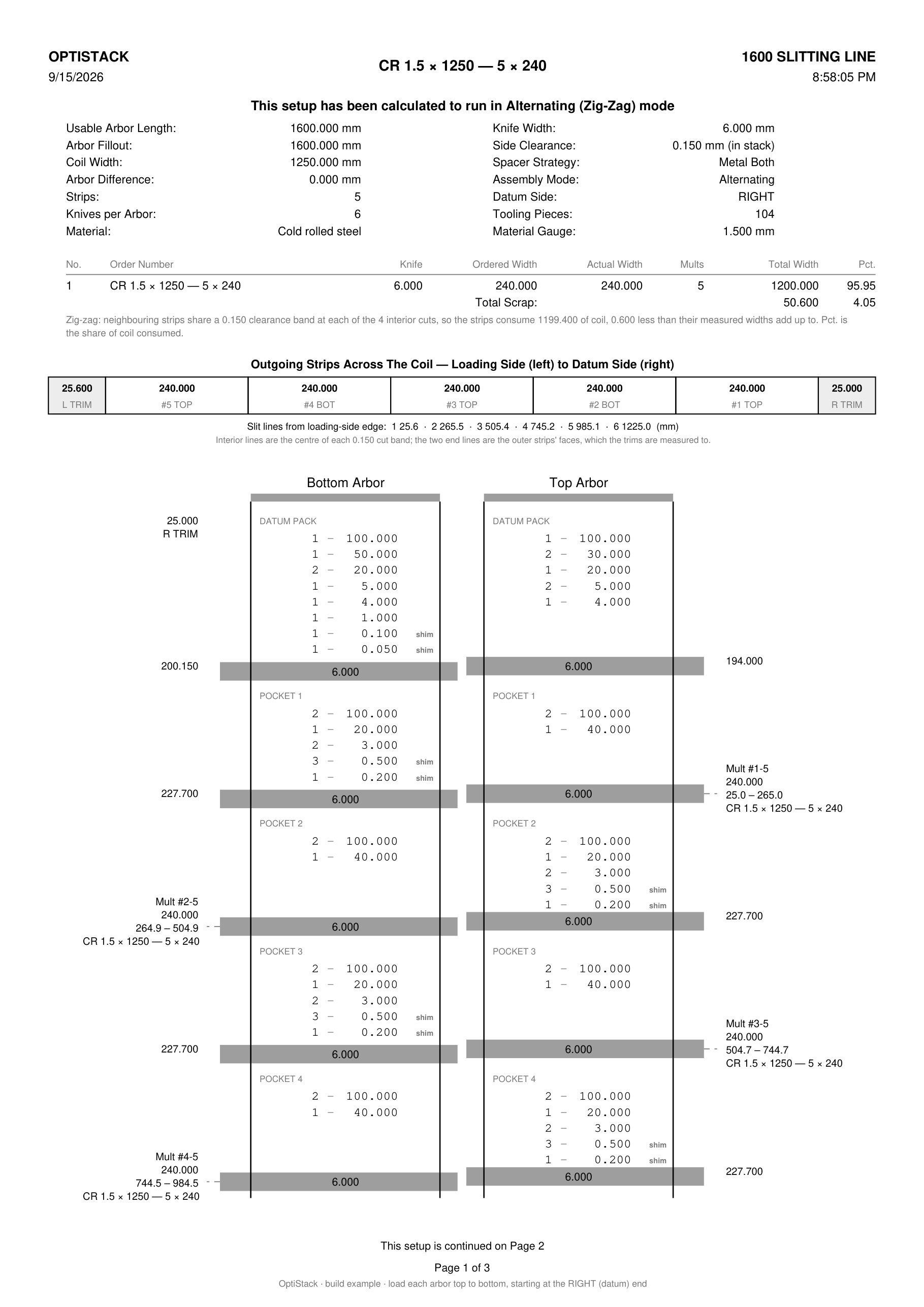
This is a real export from OptiStack Pro, untouched: a 1250 mm cold-rolled coil slit into five 240 mm strips on 6 mm knives, male/female engagement. Every ring, every knife, in the order it goes on the shaft.
 READY · everything in stock
Page 1 of 3, exported as-is. Tap it to open at print size.
Strips across the coil, trims and slit lines
Loading side to datum side, every strip numbered with the arbor that defines it (#1 TOP, #2 BOT and so on), both trims marked, and the slit lines measured from the loading edge, which are the numbers a setter checks with a tape.
Male and female pockets, top to bottom, in loading order
Datum pack, pocket 1 to pocket 5, clamp pack, on both arbors. The female pocket is the strip (240.000); the male pocket opposite it closes the cut (227.700). Every ring is listed by count and width, with the knife drawn as a bar between them, exactly as it goes on the shaft.
Clearance already in the stack
The bottom datum pack carries one knife thickness plus one side clearance. The knife is 6.000 and the clearance is 0.150, and it is that 0.150 that the shims build, as 0.100 plus 0.050. Every slit line is cut with the same 0.150 per side as built, so there is nothing to set at the machine.
Gather list, arbor totals and sign-off
The last page is the pull list by size and arbor, what a tape reads across each finished arbor, and Built by / Verified by lines. Anything not in stock is listed before you start.
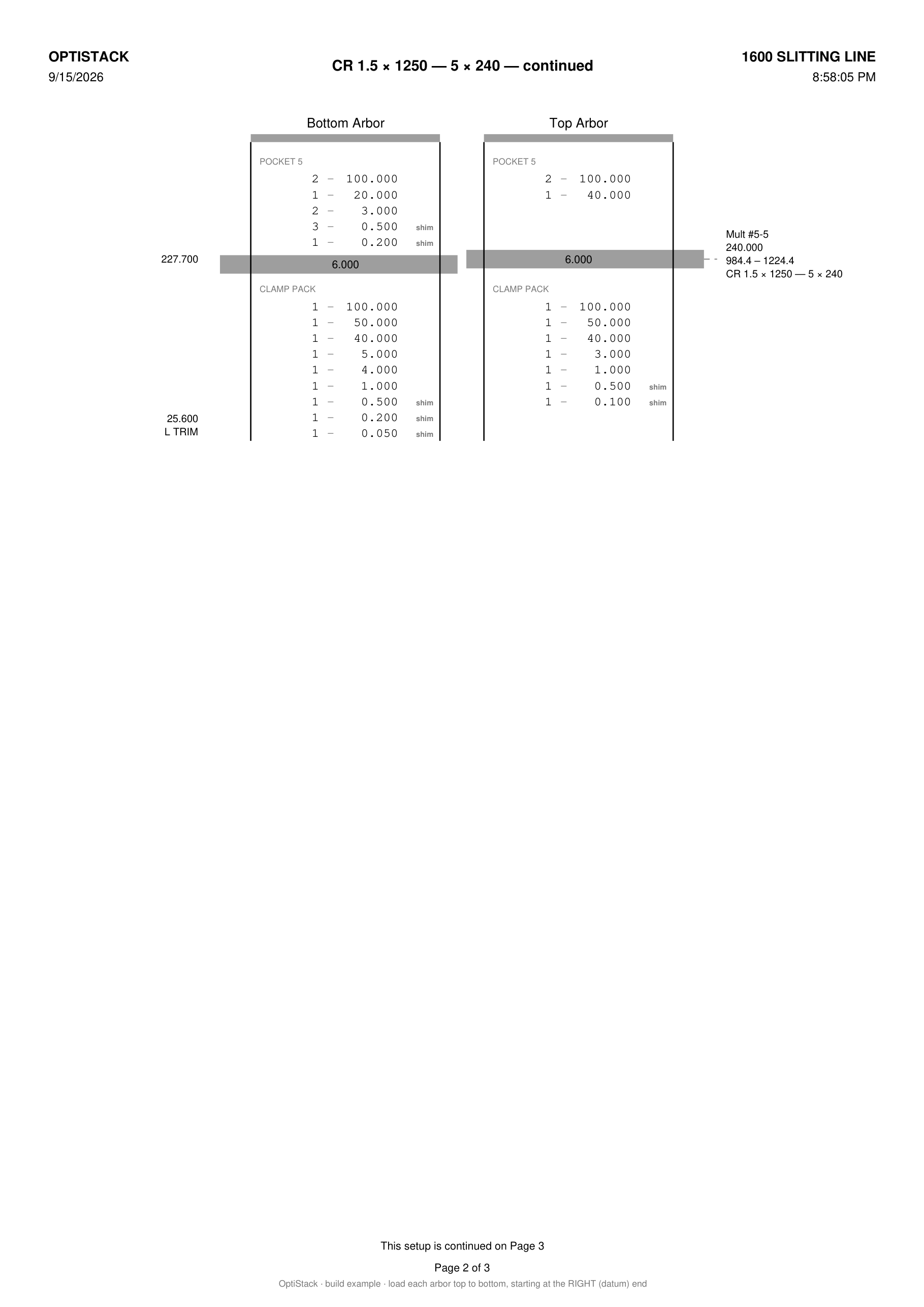 Page 2: pocket 5 and the clamp packsOpen at print size
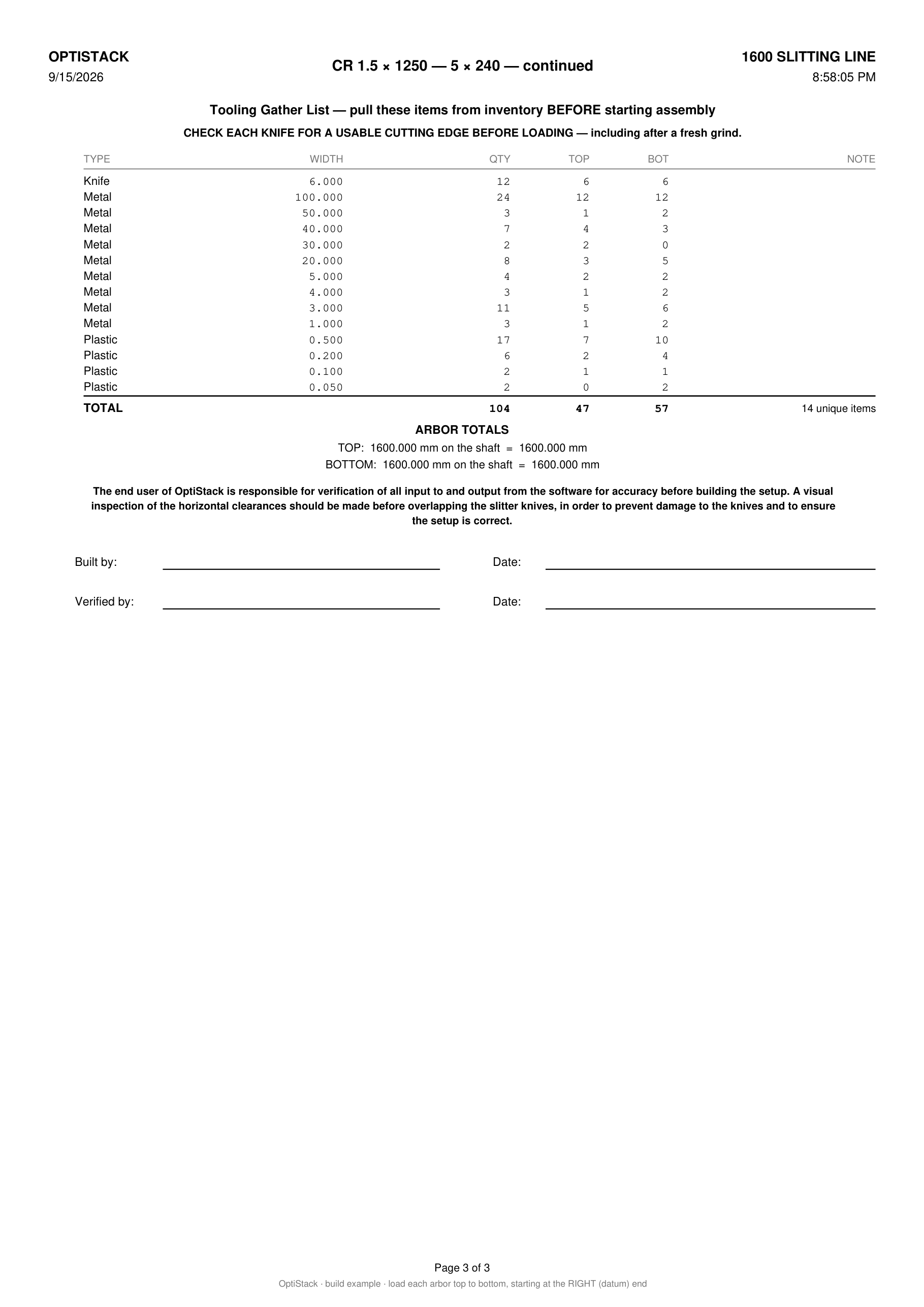 Page 3: gather list, arbor totals, sign-offOpen at print size
Built from your own knives and spacers. If a piece is not in stock, the sheet says so before you start.
See OptiStack Pro in action
Watch a slitting line setup go from job entry to a buildable arbor map and BOM, using only the knives and spacers in stock.
Why steel service centers switch to OptiStack
vs. how most slitting operations handle arbor setup today
| Capability | OptiStack Pro | Excel / Paper | Generic ERP |
|---|---|---|---|
| Builds from actual inventory only | ✓ | ✗ | ✗ |
| Detects unbuildable setups before loading | ✓ | ✗ | ✗ |
| Arbor stack map with visual diagram | ✓ | ✗ | ✗ |
| Printable shop-floor PDF with BOM | ✓ | Manual | Some |
| Shimless + plastic shim modes | ✓ | ✗ | ✗ |
| Alternating knife engagement | ✓ | ✗ | ✗ |
| Refuses a pack your stock cannot build | ✓ | ✗ | ✗ |
14-day free trial · No credit card required
1976
Building Slitting Tooling Since
OptiStack is built by Maxwell Slitter Industries, who have made slitter knives and spacers since 1976
<60s
Job Entry to Printable BOM
The solve itself, not a claim about your total changeover time
5
Languages on the Setup Sheet
English, Spanish, Italian, Russian and Portuguese, in metric or imperial. German and Turkish print in English
No credit card required
Smart Setup Finder
Finds best spacer combination from your inventory
Step 1
Your Spacers Loaded
Step 2
Target Width Entered
Step 3
Best Fit Calculated
Step 4
Load Order Generated
Result
Setup Ready for Shop Floor
Error
±0 µm
±5 µm
Tolerance
100%
Inventory-Based
Automated slitting line setup, from your actual inventory.
Our solver scans your complete spacer inventory and finds the optimal combination for any target width, using only what you actually have in stock. Every setup is buildable. Every BOM is verified against your real parts.
Scans your full inventory to find the best spacer combination
Eliminates burrs by optimizing knife-to-spacer positioning
Generates load order ready for the shop floor in seconds
What the solver guarantees
Every job0.01mm
Stack Precision
<60s
Job Entry to BOM
Stock
Built From Yours Only
Optimal slitting machine configuration generated
Slitting line setup software that
generates arbor setups + BOM.
Save machine presets, load your knife/spacer inventory, and generate a printable setup map for every job.
Machine presets
Store arbor dimensions, reserves, and clearance rules once. We handle the math for every future build.
Inventory-only builds
Algorithms that use only the knives and spacers you actually have in stock, no physically impossible setups.
Setup map + BOM
Generate a top & bottom arbor build sheet with exact spacer widths and quantities for the shop floor.
14-day free trial · No credit card required · Setup takes 2 minutes
Built on slitting-line experience going back to 1976.
The people who wrote this also grind the knives and spacers it calculates with. That is why it refuses to print a pack your inventory cannot build, which is the failure mode a generic ERP has no way to see.
Longer Knife Life
Rotation guidance that reduces edge wear and extends time between regrinds.
Zero-Error Visualizations
Interactive 2D diagrams for arbor setup, ensuring operators get it right the first time.
Dynamic Waste Reduction
Intelligent trim management that recovers value from every coil millimeter.
Frequently Asked Questions
Quick answers about OptiStack's shimless tooling and fractional kit workflow.
What is slitting knife software?
How does slitter knife setup software work?
How much time does OptiStack save per slitting job changeover?
Can OptiStack help reduce burrs and edge defects?
Can OptiStack generate printable slitter setup sheets?
Can OptiStack work without plastic shims?
How does the system handle plastic shims?
Is the Imperial unit conversion accurate for precision work?
What happens if my inventory can't build the setup?
How does edge quality management work?
Does OptiStack connect to my existing ERP or inventory system?
Can I manage multiple slitting machines in one account?
What is coil slitting software?
Do I need software to set up a slitting line?
What is the difference between coil slitting software and a spreadsheet?
Can coil slitting software work with my existing tooling inventory?
Free Slitting Tools & Resources
Free calculators and operator guides for slitting lines. No login needed.
Latest from Our Blog
Operator guides, setup tips, and industry insights, written by the people who run slitting lines.