If you run a slitting line, you have several options for managing arbor setups, from manual spreadsheets to dedicated software. This guide compares the major solutions available in 2026, but more usefully, it gives you a way to judge any slitting software on its own merits so you can decide what actually fits your operation.
Disclosure: this comparison is written by the OptiStack team. We describe competitor products at the level of capability categories using publicly available information, and we avoid quoting specifics we cannot verify. If anything here is out of date, please contact us and we will correct it.
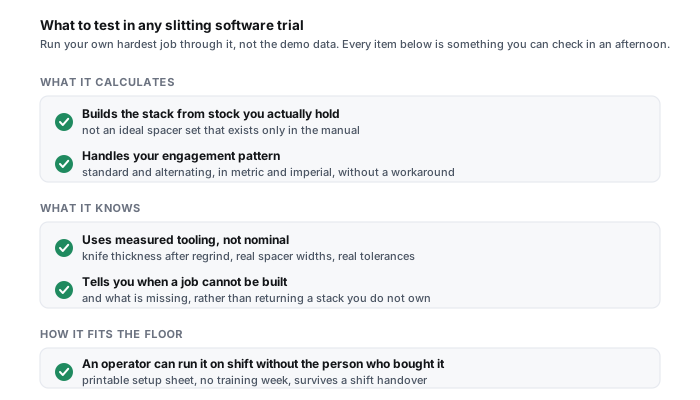
What to test in any slitting software trial
Before you compare products, decide how you will judge them. The demo that a vendor drives always looks good. What matters is how the tool behaves on your worst job, not their best example. Run every trial through the same checklist, using your own numbers:
- Feed it a real inventory shortage. Enter a spacer set that is missing a common width and see what the software does. Does it refuse the impossible build and tell you why, or does it hand you a stack map that cannot be assembled on the floor?
- Try your tightest tolerance job. Use the pattern that gives your crew the most trouble. Check whether the result is buildable from graduated spacers or whether it quietly assumes shims you do not stock.
- Time a full changeover, end to end. From entering the job to a printed setup sheet in a operator's hand. Minutes of clicking is still faster than manual math, but the spread between tools is large.
- Check the shop-floor output. Can a setup person who has never seen the software follow the printed sheet without a laptop? A visual arbor diagram and a clear load sequence matter more than any on-screen feature.
- Push an alternating (zig-zag) engagement pattern. This is where manual math and weak tools fall apart. If the software cannot handle alternating engagement cleanly, it will not save your hardest setups.
- See how it fails. Enter nonsense on purpose. Good software catches bad input at the gate and explains it. Weak software produces a confident, wrong answer.
If you want a fast, no-signup way to sanity check spacer stacks while you evaluate, the free slitting calculator computes pocket widths and clearance from your own numbers.
The options at a glance
| Capability | OptiStack Pro | TKM CASKA | ANDRITZ ASKOedge | Spreadsheet |
|---|---|---|---|---|
| Arbor stack map generation | Yes | Yes | Yes (clearance focused) | Manual |
| Inventory-aware builds | Yes, strict quantity checking | Partial | No | No |
| Shimless / fraction kit mode | Yes | Unknown | No | No |
| Alternating engagement | Yes | Yes | Yes | Very difficult |
| Printable shop-floor sheet | Yes, visual diagram and BOM | Yes | Yes | Manual |
| Web-based (no install) | Yes | Desktop | Desktop | N/A |
| Metric and imperial units | Yes | Yes | Yes | Manual |
| Pricing model | SaaS subscription | License | License (with tooling) | Free |
| Free trial | 14 days, no card | Demo on request | Demo on request | N/A |
Read the matrix as capability categories, not a scoreboard. Two tools that both say "yes" to arbor stack maps can produce very different results on an inventory-constrained job, which is exactly why the trial checklist above matters more than the grid.
Two more tools come up when you search for this: thyssenkrupp's knife assembly software and Cowles Tool's Carswin Advantage Plus. Their own pages say too little to fill every row of the grid honestly, so they are described below instead of guessed at.
The capability categories that actually differ
Under the surface, slitting software splits along four questions. Deciding which of these you care about tells you which tool to shortlist.
1. Does it build from your real inventory, or from an ideal parts list?
The single biggest divide. Some tools compute a mathematically ideal stack and assume you can source any spacer width. Others check the build against the parts you actually have and refuse setups you cannot assemble. If your crew has ever walked to the arbor with a setup sheet only to find the spacer does not exist in the drawer, inventory-aware building is the feature that pays for the software.
2. Does it support shimless operation?
Shimless setup, using graduated fraction-kit spacers instead of stacks of loose plastic shims, delivers tighter and more repeatable tolerance and faster changeover. Not every tool models it. For the method and the numbers, see shimless slitting setup with fraction kits.
3. Does it optimize clearance, or leave clearance to you?
Some tools focus on clearance and edge-quality optimization, which is valuable for hard grades. Others treat clearance as an operator setting and focus on the stack build. Neither is wrong; it depends on whether your pain is edge quality on tough material or setup speed and buildability. For clearance on hard grades, see slitting advanced high-strength steel.
4. Where does it run, and who has to install it?
Desktop software ties a setup to one machine; web-based software follows the operator to any device and any site. For a single line this rarely matters. For multi-site service centers it matters a lot.
The options, described honestly
TKM CASKA
CASKA, which TKM expand as Computer Aided Slitter Knife Assembly, is written by TKM themselves, a maker of slitter knives and tooling. Their own description is a tool for working out arbor build plans for a given set of cutting jobs on a slitting line. It is best thought of as the integrated choice for operations standardized on that supplier's tooling. Because we cannot verify its current feature set in detail, we describe it only at the category level: mature stack generation, tied to a desktop and a tooling ecosystem.
ANDRITZ ASKOedge
ASKOedge comes from ANDRITZ Metals, another major tooling manufacturer, who describe it on their own site as a clearance-control slitting program aimed at slit edge quality on packed arbors, advanced high-strength steel included. It fits operations whose primary challenge is edge quality on demanding grades and who are already in that tooling ecosystem. Again, we keep this at the category level rather than quoting specifics we cannot verify.
thyssenkrupp knife assembly software (toii)
thyssenkrupp Materials Processing Europe offer knife assembly software from their toii platform, developed with tk accelis IoT. Their own page describes a browser-based web application that runs on the customer's own servers, on premise or in the cloud, and calculates knife assembly plans automatically from the production planning in an ERP system, taking the order sequence into account, with integrated tool management. That makes it the natural shortlist for a service centre that already plans production in an ERP and wants arbor plans to follow from it. The page quotes no price and offers a demo appointment.
Cowles Tool Carswin Advantage Plus
Cowles Tool, a slitter knife and tooling supplier, offer Carswin Advantage Plus, which they call a slitter tooling setup software program. Their page says the user can define and change virtually any parameter relating to their operation, and that it is a comprehensive program with no add-ons. It does not say how the program is installed or priced, so as with CASKA we leave it there: a setup program from a tooling supplier, best judged by a demonstration on your own worst job.
OptiStack Pro
OptiStack is a web-based application built by Maxwell Slitter Industries, a cutting-tool manufacturer with decades of slitting-line experience. Its focus is buildability: strict inventory checking so it never generates a stack you cannot assemble, fraction-kit and shimless workflows, visual arbor diagrams, and printable shop-floor sheets, all in the browser with no install. It is honest about its gaps too: it is newer than the incumbents, it does not yet integrate with ERP systems, and it leaves clearance as an operator setting rather than auto-optimizing it. It is the fit when buildable-from-stock setups and setup speed are your pain, less so if automated clearance optimization on exotic grades is your only goal.
Spreadsheets and manual calculation
Free, familiar, and genuinely fine for some operations. A spreadsheet is honest work when the job list is short and stable. Its real costs show up as it scales: it cannot check inventory, it offers no visual verification, alternating engagement is painful to model, and the knowledge lives in one person's head. The next section is about exactly when that trade is still worth it.
When a spreadsheet is genuinely enough
Software vendors rarely say this, so we will: if you run one or two changeovers a week, on a stable set of patterns, on forgiving gauge, with one experienced setup person who is not going anywhere, a well-built spreadsheet is a reasonable tool. You know your patterns, the math does not change, and the overhead of learning and paying for software may not return much. Use the free calculator to remove the arithmetic and keep your spreadsheet for the record.
The calculus changes when any of these become true: changeovers climb past a handful a week, your inventory is tight enough that "ideal" stacks are not buildable, you run alternating engagement or tight tolerance regularly, you operate more than one site, or your setup knowledge is concentrated in one person you cannot afford to lose. Each of these is a place spreadsheets quietly leak time and scrap.
When OptiStack is not the right fit
To keep this comparison honest, here is where we would not recommend OptiStack today. If your only goal is automated clearance and edge-quality optimization on exotic or advanced high-strength grades, a clearance-focused tool may serve you better, because OptiStack leaves clearance as an operator setting. If you require deep, live ERP or MES integration right now, that is on our roadmap but not shipping, so it is a gap. And if you genuinely run a low, stable changeover load with a spreadsheet that already works, the honest answer is that you may not need us yet. We would rather tell you that than sell you a subscription you will not use.
Understanding the pricing models
Comparing sticker prices misses the point, because these tools use different pricing models with different total costs of ownership. In general terms:
- Perpetual license. A larger upfront payment per seat or machine, often tied to a specific desktop, sometimes bundled with a tooling relationship. Predictable once bought, but upgrades and additional seats usually cost more, and the software is tied to that machine.
- License bundled with tooling. The software effectively comes with a tooling commitment. This can look inexpensive on paper if you are buying that tooling anyway, but it couples your software choice to your supplier choice.
- SaaS subscription. A recurring per-user or per-site fee with no hardware to buy, updates included, and access from any device. Lower to start and easy to add or remove seats, at the cost of an ongoing payment. This is OptiStack's model, with a free trial so you can test before you commit.
- Free (spreadsheet). No license cost at all. The real cost is time per setup and the risk of an error reaching the floor.
Whatever the model, weigh it against the cost of one bad setup. A single unbuildable or mismeasured stack that reaches production, and the scrap, rework, and quality claim that follow, usually costs more than a month of any of these tools.
Rolling new software onto the floor
The tool you pick only helps if the crew actually uses it, and setup people are rightly skeptical of anything that slows down a changeover. A few things make adoption stick. Keep the spreadsheet running in parallel for the first few weeks so nobody feels the floor is exposed, and compare the two on real jobs; when the software wins on the hard setups, the crew converts itself. Load your real spacer and knife inventory before you judge speed, because a tool fed an accurate drawer is a different experience from one guessing at parts. Print the setup sheet and build from paper at the arbor, not from a laptop balanced on the guard. And put one setup person in charge of the inventory data, because the software is only as good as the drawer it thinks you have.
Expect the first week to feel slower while people learn the input screens. By the second or third week a clean changeover should beat the old manual method, and the gap widens on your worst jobs. If it does not, that is useful information: either the data is wrong or the tool is a poor fit, and you found out during the trial instead of after the purchase.
What no slitting software can do for you
Set expectations honestly, because software is not a cure for a tired line. No setup tool can fix a shaft that has lost concentricity, knives that are past their edge, ejector rings that no longer strip, or tension that is uneven across the strips. It will compute a perfect stack and the line will still make burrs if the tooling underneath is worn. Software removes the math error and the unbuildable setup; it does not remove the mechanical faults covered in the slitting problems guide or the wear covered in blade life by grade.
The right mental model is that setup software and disciplined tooling maintenance are two halves of the same job. The software guarantees the numbers are right and buildable from stock; maintenance guarantees the shaft, knives, spacers, and ejector rings can deliver those numbers. Buy the software to remove the guesswork, and keep the maintenance schedule to remove the mechanical drift. Neither one alone gives you a repeatable clean edge.
See buildable setups from your own inventory in a few minutes.
Start a free 14 day OptiStack Pro trial, no credit card required.
Start free trialWhich should you choose?
Map your primary pain to the tool:
- Buildable-from-stock setups, shimless workflows, or multi-site web access are your priority: shortlist OptiStack Pro and run the trial checklist above.
- Automated clearance and edge quality on advanced grades is your main challenge and you are in a clearance-focused tooling ecosystem: shortlist a clearance-focused tool.
- Integration with an existing tooling supplier's ecosystem matters most: shortlist that supplier's software.
- One or two stable changeovers a week with a reliable setup person: a spreadsheet plus the free calculator may be all you need.
Whatever you choose, the goal is the same: stop relying on unaided manual calculation for production setups. For the tooling those setups depend on, see the slitting line tooling guide. For blade selection and life, see how to choose rotary slitter blades and blade life by grade.