In a typical steel service center running 5-10 slitting jobs per day, changeover time is the single largest source of lost capacity. If each changeover takes 45 minutes and you run 8 changeovers daily, that's 6 hours of production time lost every day, or roughly 75% of a shift doing nothing but setup.
Yet some operations have reduced this to under 10 minutes per changeover. Here's how.
Where Setup Time Actually Goes
Before optimizing, you need to understand where time is spent. In a typical 45-minute manual changeover:
- 15-25 minutes: Calculating spacer combinations and verifying inventory
- 10-15 minutes: Physically loading/unloading tooling on arbors
- 5-10 minutes: Setting clearance and running test cuts
- 5-10 minutes: Searching for specific spacers in the shop
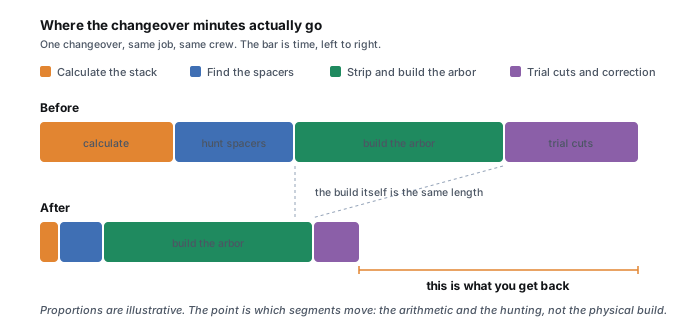
Notice that the majority of time isn't spent physically handling tooling. It is spent on calculation and searching for parts. This is where the biggest gains are available.
Strategy 1: Eliminate Manual Calculation
The single biggest time saver is replacing spreadsheet/manual spacer calculation with software that generates the setup automatically. This alone typically cuts 15-25 minutes from every changeover.
Software like OptiStack Pro generates the complete spacer combination, load sequence, and assembly sheet in under 60 seconds, from your actual inventory. The operator receives a printable sheet showing exactly which spacers to pull and in what order to load them.
Calculate your specific savings with our free ROI calculator.
Strategy 2: Pre-Stage Tooling
In a well-optimized operation, the setup for the next job is prepared while the current job is still running:
- Generate the setup sheet for the next job before the current one finishes
- Pull all required spacers and knives to a staging area next to the line
- Verify all parts are clean, measured, and in correct condition
- Pre-assemble sub-stacks if your arbor design allows it
This converts changeover from a serial process (one step at a time) to a parallel process (next job prepared while current one runs), applying the SMED (Single-Minute Exchange of Die) philosophy to slitting.
Strategy 3: Organize Spacer Inventory
Many service centers store spacers in random bins, requiring operators to search through hundreds of parts for each setup. This wastes 5-10 minutes per changeover.
- Label every spacer with its exact width (engraved or color-coded)
- Organize by width in clearly marked bins or racks
- Track quantities so you know what's available before starting setup
- Keep an accurate digital inventory: when software knows what you have, it only generates buildable setups
For a deeper guide on waste reduction, see our scrap reduction playbook.
Strategy 4: Standardize Setup Procedures
Create a written standard operating procedure for arbor setup. This should include:
- Cleaning checklist (arbor shaft, spacers, knives)
- Loading sequence (datum end to clamp end)
- Clearance settings by material type and gauge
- Test cut verification criteria
- Edge quality inspection standards
When every operator follows the same procedure, setup quality becomes consistent regardless of who's on shift. Our troubleshooting guide covers the most common setup errors and how to prevent them.
The Combined Impact
| Change | Time Saved per Setup |
|---|---|
| Automated calculation (software) | 15-25 minutes |
| Pre-staged tooling | 5-10 minutes |
| Organized inventory | 5-10 minutes |
| Standardized procedures | 2-5 minutes |
| Total reduction | 27-50 minutes |
A 45-minute changeover becomes a 10-15 minute changeover. Over 8 changeovers per day, that's 4+ hours of production time recovered daily.
Strategy 5: Make changeover time a number you watch
What gets measured gets managed. Most service centers cannot tell you their average changeover time to the minute, which means they cannot tell when it is slipping. Put a simple timer discipline in place: log the stop time and the first-good-strip time for every changeover, and post the weekly average where the crew sees it. You are not trying to police operators; you are trying to see the process. A changeover that suddenly takes twice as long is a signal, usually a missing spacer, a data error, or a tooling problem, and catching it the same day is far cheaper than discovering it in a monthly report.
Once the number is visible, treat a regression like any other line fault: find the cause, fix it, and move on. Operations that hold their setup time do it because the number is on the board, not because they bought one clever tool.
Common objections, answered
- "Our jobs are too custom for software." Custom widths are exactly where manual math is slowest and most error prone. The more unique your patterns, the more a solver that builds from your real inventory saves, because there is no memorized setup to fall back on.
- "Our operators won't use a computer." They do not have to. The setup is generated once, printed as a visual sheet, and built from paper at the arbor. The operator follows a load order, not a screen.
- "We only run a few changeovers a week." Then the calculation and search time still hurts on each one, and pre-staging is nearly free to adopt. Start with organizing the spacer inventory and the free calculator, and add software if the volume grows.
- "We already know our setups by heart." One person does, and that is the risk. The day that person is out sick or leaves, the knowledge walks out with them and changeover time spikes. Written procedures and generated setup sheets turn tribal knowledge into something any trained operator can repeat.
None of these objections survive a measured trial. Time five real changeovers the way you run them today, then time five more with the calculation automated and the tooling pre-staged, and let the numbers on your own line make the decision.
A changeover walkthrough: the old way versus the new way
Numbers are easier to trust when you can see the shift. Here is the same job changeover, a 6-strip pattern on 1.0mm carbon steel, run two ways.
The old way: about 45 minutes
- 0 to 20 min. The setup person opens a spreadsheet, enters the strip widths, and works out the spacer stack for each of the six pockets. Two pockets need a fraction that the standard spacers cannot hit, so they plan a shim stack. Halfway through they are interrupted and lose their place.
- 20 to 30 min. They walk to the spacer racks and hunt for the specific widths. One 0.30 spacer is not where it should be, so they measure a few candidates with a micrometer to be sure.
- 30 to 40 min. Tooling comes off the arbor and the new stack goes on, pocket by pocket, with the shims padded in last.
- 40 to 45 min. Clearance is set, a test cut is run, and the first strip measures a hair wide because of a mismeasured spacer. They pull the pocket, swap a part, and run a second test.
The new way: about 11 minutes
- Before the line stops (parallel). While the current job is still running, the operator generates the next setup sheet in software. It computes all six pockets from the real inventory, uses fraction kit spacers instead of shims, confirms every part is in stock, and prints a load sequence. All required spacers and knives are pulled to a staging cart.
- 0 to 7 min. The line stops. Old tooling comes off, new tooling goes on straight from the staging cart in the printed order, largest spacer nearest each knife.
- 7 to 11 min. Clearance is set from the sheet, one test cut confirms width and edge, and the job runs. No hunting, no micrometer guessing, no re-shimming, because the stack was buildable and verified before the line ever stopped.
The physical loading barely changed between the two runs. What disappeared was the calculation, the searching, and the rework, which is exactly where the 20 to 25 minutes lived. Pre-staging during the previous run removed most of the rest. Estimate the annual value of that recovered time for your own line with the free ROI calculator, and try a single pocket in the free slitting calculator to see the spacer math the software is doing.
The hidden cost: it is not just the minutes
Long changeovers cost more than the clock shows. Every minute the line is stopped is inventory sitting as work in progress instead of shipping. Long, tedious setups push crews to batch jobs into fewer, larger runs to avoid changeovers, which raises inventory and lengthens lead times to your customers. And a setup that depends on one person's mental math is fragile: when that person is on vacation or leaves, changeover time and error rates jump. Cutting setup time is really about making the line flexible enough to run small orders profitably and consistent enough that any trained operator can hit the same result.
Getting Started
You don't need to implement everything at once. Start with the highest-impact change: automating the calculation step. Start a free 14 day trial and measure the time difference on your next 5 changeovers. For the tooling these setups rely on, see the slitting line tooling guide, and for shimless pockets specifically, see shimless slitting setup with fraction kits.