Free Slitting Calculator: Knife Spacing and Spacer Setup
Calculate knife spacing, spacer widths, and arbor setup requirements. Enter your coil width and slit pattern to get instant results.
Built by Maxwell Slitter Industries, making slitter tooling since 1976.
Input Parameters
Usable width is the coil width minus two times the edge trim. The slit pattern must fit inside it.
Auto filled from material (cold rolled steel 8%, 304 stainless 12%, 1xxx and 3xxx aluminium 5%). Override anytime.
Calculation Results
Enter parameters and click Calculate
On this page4 sections
How does the slitting calculation work?
The arithmetic behind a slitting setup is short, and knowing it makes the numbers above readable rather than magic. Start from the master coil width and subtract the edge trim you intend to take off both sides. What is left is the working width, and it has to be divided exactly among your finished strips. Anything the strips do not use is scrap you did not plan for.
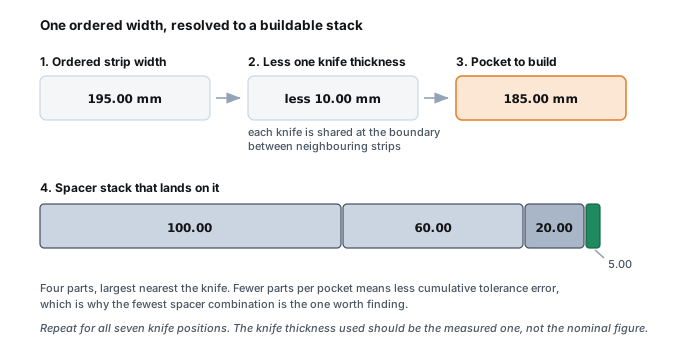
Each cut happens at a boundary plane, and those planes sit one finished strip width apart. Cutting six strips means seven boundaries, because both outer edges are cut too. The part you physically build is the pocket, the spacer stack sitting between two neighbouring knives, and a pocket is the strip width minus one knife thickness. That subtraction catches people out, and it is not arbitrary: each knife is shared between the strip on its left and the strip on its right, so its thickness is counted once at the boundary rather than twice.
Clearance is a separate calculation running at right angles to all of that. It is how far apart the two knife faces sit sideways, given as a percentage of gauge per side: 8 to 10% per side for carbon steel, 10 to 14% for stainless, 5 to 6% for aluminium. These percentages are shorthand for typical tensile bands rather than properties of the metal itself, so the same alloy in a hard temper and a soft temper will not take the same figure. Treat them as a starting point and confirm with a test cut. The full breakdown by tensile band is in the slitter knife clearance chart. Clearance does not change the width arithmetic. It decides whether the edge shears cleanly or tears, which is why an otherwise perfect stack can still produce a bad edge.
A worked example, start to finish
Take a 1200 mm master coil, six finished strips at 195 mm each, knives 10 mm thick, material 1.0 mm carbon steel.
- Strip total: 6 × 195 mm = 1170 mm.
- Edge trim: 1200 mm − 1170 mm = 30 mm total, so 15 mm off each side.
- Boundaries: six strips need seven knife positions, one at each strip edge.
- Pocket width: 195 mm − 10 mm = 185 mm of spacers between each neighbouring pair of knives.
- Clearance: 1.0 mm gauge at 10% = 0.10 mm per side.
The 185 mm pocket is the number that has to be assembled from real parts, and that is the step where a calculation stops being arithmetic and becomes an inventory question. If your spacer set can reach 185 mm exactly, the build is clean. If the closest you can get is 184.8 mm, you either accept a strip 0.2 mm narrow or you make it up with a thin precision spacer. Multiply that decision by seven boundaries and you have the reason setup takes as long as it does.
Note also that the 15 mm edge trim was a leftover, not a decision. If your process needs a specific trim to clear the mill edge, you set the trim first and let the strip count follow, rather than discovering afterwards that the trim is thinner than the rough edge you were trying to remove.
Which inputs actually matter?
Four inputs carry almost all the risk, and the rest are close to rounding error.
Measured knife thickness. This is the input most often wrong, because it is usually typed in from the original order rather than measured. A knife loses thickness at every regrind, and the loss is not the same for every knife. Since thickness sits inside the pocket calculation at every boundary, an error here moves every strip. Measure the knives you are about to fit and use the measured number. This is covered in depth in the slitter knife software guide.
Material gauge. Gauge also drives coil length and weight, which the coil calculator works out from the same figures. Gauge drives clearance. Using the nominal gauge for material that is running at the top or bottom of its tolerance band puts your clearance percentage off before the first cut.
Coil width, as it actually is. Master coil width varies from the number on the tag. If the width is 3 mm under, that 3 mm comes out of your edge trim, and if your trim was already tight, it comes out of a finished strip instead.
What your spacer inventory can actually build. A target pocket width is only useful if the parts exist to hit it. This is the input a generic calculator cannot know, and it is why a calculated setup and a buildable setup are not the same thing.
Common mistakes this calculator cannot catch
A free calculator works on the numbers you give it, so it is worth being explicit about the failures it will happily let through.
Using nominal knife thickness. The most common and most expensive one. The output will be internally consistent and still wrong at the arbor.
Forgetting the knife is shared. Building each pocket to the full strip width, rather than the strip width minus one knife thickness, produces a stack wider than the coil and a setup that will not close.
Mixing units mid-setup. Working a job in inches while the spacer drawer is labelled in millimetres is a reliable way to generate an error too small to see and too large to ship.
Ignoring spacer compression. Rubber bonded spacers compress under clamp load, so they should not be the part carrying your critical dimension. Metal sets the width, rubber controls the strip. See the slitting line tooling guide for how the parts divide that work.
Assuming the stack is buildable. The calculation above gives you a target. Whether your drawer contains a combination that reaches it is a different question, and answering it by trial at changeover is what turns a ten minute setup into forty. If the strips come out wrong anyway, the slitting problems guide works back from the symptom to the cause.
Free Calculator vs OptiStack Pro
What the free calculator works out, and what the full product adds when the setup has to be built from your own rack
Free Calculator
- Basic knife spacing calculation
- Estimated spacer widths
- Manual clearance entry
- Single setup at a time
- Pro only: Exact shim specifications
- Pro only: Inventory integration
- Pro only: Printable assembly sheets
- Pro only: Multiple knife engagement modes
- Pro only: Shop floor diagrams
- Pro only: Save & recall setups
$0
Forever free
OptiStack Pro
- Production-grade accuracy (±0.1mm)
- Real inventory integration
- Automatic shim optimization
- Multiple knife engagement modes
- Printable shop floor sheets
- Save unlimited setups
- BOM & scrap calculations
- Multi-language support
- Edge quality tracking
- Priority email support
14 Days Free
Then $79 per month
Weighing setup software more widely? See how OptiStack, CASKA and ASKOedge compare, and what to test in any trial.
Frequently Asked Questions
Ready for Production-Grade Setups?
Stop guessing spacer combinations. OptiStack Pro uses your actual inventory to calculate buildable setups with exact shim specifications.